Protected mandate cockpit
You engage EPV for leadership, assessment or advice. EPV remains accountable for the agreed service. Protected access is included in the mandate.
Not your own white-label system.
 Insight. Performance. Decision.
One system for day-to-day business management.
Who is responsible? Which information applies? What happens next?
Configured for your business. Built on a standardised core.
The problem
You have software. Yet someone still needs to know which information applies, why a decision was made and who acts next.
For the agreed workflows, EPV │ OS brings information, responsibilities and next steps into one shared workspace. Existing specialist systems remain where they make sense.
In everyday work
More than information side by side. One traceable working record for the workflows you agree with EPV.
See your own tasks, pending decision work and the cases you are authorised to access in one place.
Keep the issue, its owners, working record and next steps in context.
Sources, dates and context distinguish facts, observations, hypotheses and missing information.
Keep the question, alternatives, risks and reasoning together. Preparation and decision-making require separate permissions.
Find PDF and Word documents within the case and see their review status, subject to your permissions.
Track actions with an owner, deadline and completion criterion. Keep blockers and recorded outcomes visible.
Inside the management overview
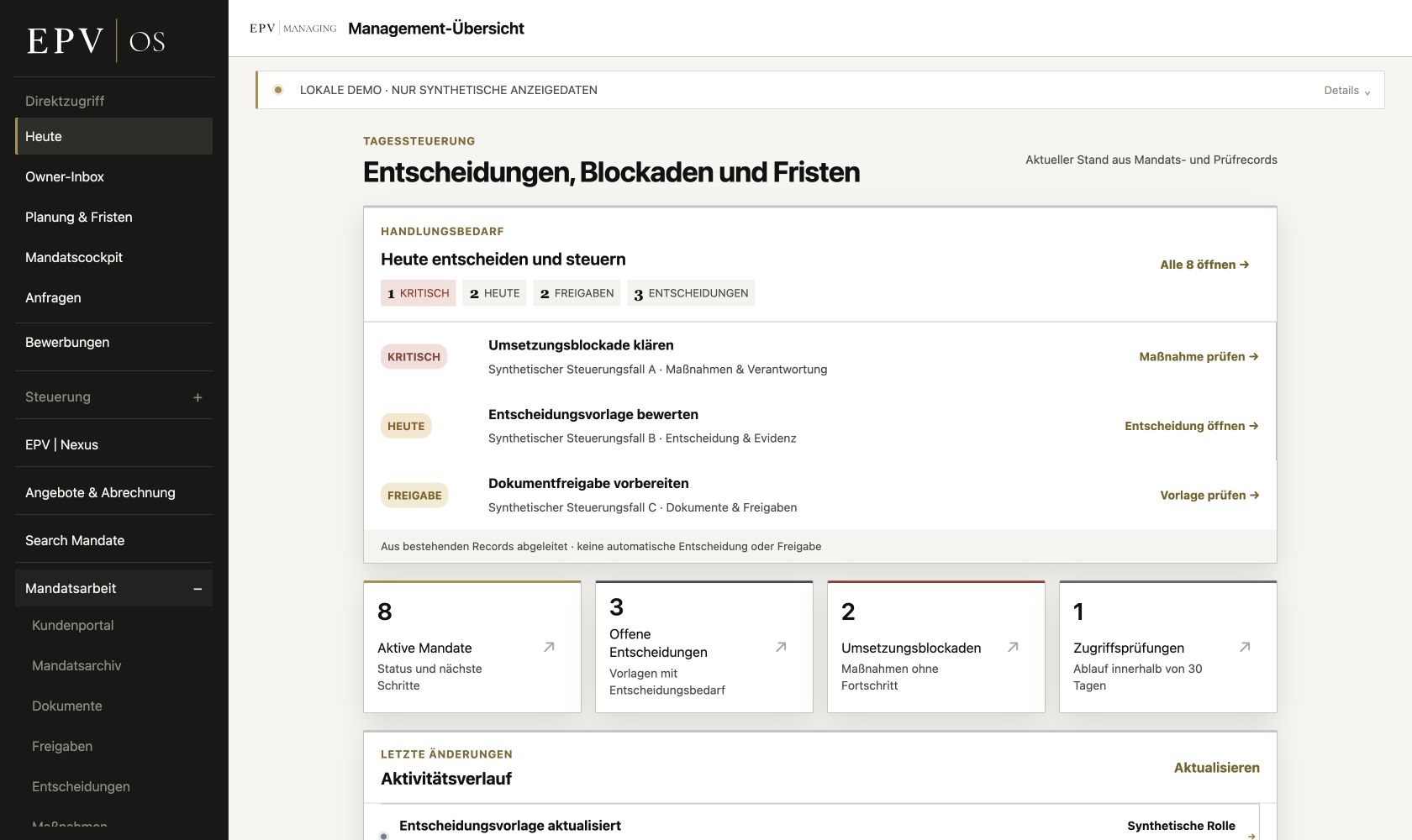
The management overview brings open decisions, tasks and next steps together. This original German capture shows a synthetic EPV working environment, not a client instance.
One workflow. In practice.
Illustrative workflow, not a client case or an automatic approval or action.
A supporting document is missing before internal project approval. The open question is assigned to a case.
A team member records the missing document as an information gap and prepares the decision.
The authorised person decides to obtain the document. An action records its owner, deadline and completion criterion.
The received document is reviewed and filed. The authorised person records the outcome and closes the action.
Knowledge → Evidence → Decision → Approval → Execution → Outcome
Two clear models
You engage EPV for leadership, assessment or advice. EPV remains accountable for the agreed service. Protected access is included in the mandate.
Not your own white-label system.You receive a dedicated instance for your business: your own branding, users, roles, data, files, configuration and defined core workflows.
Configured for your business. Standardised at its core. No client-specific source fork.
Work together. With clear boundaries.
Users, roles and responsibilities are configured for the agreed workflows. An account does not provide blanket access to all company information.
AI supports. People decide.
Defines the authoritative sources, editing permissions, responsibilities and approval roles. Stored information does not automatically become truth.
Work within explicitly permitted cases. Preparation, editing, validation and closure require separate permissions.
Protected engagement access shows the information released for that client's own EPV engagement, not the entire internal OS.
Getting started
Which problem keeps recurring? Who is involved? Which systems and legitimately usable sources are available? Your written OS fit enquiry is the starting point.
EPV reviews the use case. Workflows, users, permissions, sources and any required connections are clarified, including the work involved and commercial terms.
Branding, users, permissions and agreed workflows are configured and reviewed. Training and acceptance form part of the agreed introduction plan.
Setup, ongoing scope, support and costs are clarified before an engagement. The EPV modules shown are not a standard delivery commitment; connections are reviewed individually. Your desired 90-day outcome is not a promised delivery date.
Assess OS fit
Qualification starts with specific written information. Describe your business, the relevant workflow and the improvement you want to achieve.
EPV │ OS at a glance
Clear answers on use, boundaries, your own instance and existing systems.
EPV │ OS is a Management Operating System for knowledge-intensive businesses. It connects knowledge, evidence, decisions, approvals, execution and outcomes in a traceable workflow. AI can structure information and prepare decisions; the substantive decision remains with people.
Under an EPV mandate, protected access is part of the commissioned leadership, assessment or advisory service; the client does not acquire their own white-label system. White-label clients receive a dedicated instance for their business. No EPV mandate is required or included.
The business receives its own branding with its own domain, users, roles, data, files, configuration and defined core workflows. The technical core remains standardised and is not maintained as a client-specific source fork.
No. Existing specialist systems remain where they make sense. Relevant information is brought together in EPV │ OS where decisions, approvals and execution take place. Universal availability of integrations is not promised.
EPV first reviews written information about the business, its organisational issue, a recurring core workflow and the desired 90-day outcome. If the use case is suitable, a specific proposal follows. Scope, configuration and implementation are then formally agreed.
Briefly describe your situation. EPV reviews your enquiry personally. Scope and commercial terms are agreed before any engagement.